|
by Frank Kelly
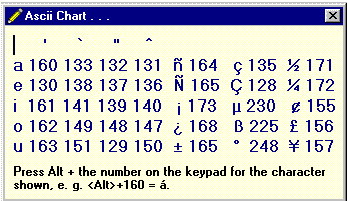
The problem is that it is not easy to remember the appropriate number for all the characters, so I have written
a tiny program that produces a popup menu. It is called ASC.EXE. Make a shortcut to it on your desktop,
and give it a keyboard shortcut of Ctrl-Shift-A, a blank icon, and rename the shortcut simply dot. It is
practically invisible on the desktop. With Power Toys you can also remove the little arrow. To make the blank
icon in Paint, enter a dot and surround it with a little box. Call it asc.bmp, then rename it asc.ico. Now you
can enter Ctrl-Shift-A from anywhere and see the popup menu, press a key or click the chart to exit, and press
on. I found that it unfortunately left me frozen in WordPerfect after accessing the popup, so I also had to press
Alt-Tab to get unstuck.
If you would like to try it click
|
 Here in Arizona we are fairly close to
México where the native language is español.
You may wish to sprinkle an occasional
foreign word in your documents from time to
time, and diacritical marks can completely
change the meaning of a word. In Spanish it
is imperative to refer to your dad as papá and
not papa, which means potato. Most word
processors have a means of inserting special
characters like this. In WordPerfect you can press Ctrl-W or click Insert|Character to get a selection that will
not only include accents but whole alphabets in Russian, Greek, Hebrew, Arabic, and Japanese. You can hunt
through the lists until you stumble on the one you want and insert it. The ASCII character set included accents
and some other useful characters like ½ in the range above 127. To insert a á in your text in any program and
any font you simply need to hold down the Alt key and enter 160 on the keypad. ¡Now you can write about
El Niño properly!
Here in Arizona we are fairly close to
México where the native language is español.
You may wish to sprinkle an occasional
foreign word in your documents from time to
time, and diacritical marks can completely
change the meaning of a word. In Spanish it
is imperative to refer to your dad as papá and
not papa, which means potato. Most word
processors have a means of inserting special
characters like this. In WordPerfect you can press Ctrl-W or click Insert|Character to get a selection that will
not only include accents but whole alphabets in Russian, Greek, Hebrew, Arabic, and Japanese. You can hunt
through the lists until you stumble on the one you want and insert it. The ASCII character set included accents
and some other useful characters like ½ in the range above 127. To insert a á in your text in any program and
any font you simply need to hold down the Alt key and enter 160 on the keypad. ¡Now you can write about
El Niño properly!

Feedback:
 Frank Kelly
LE FastCounter